# FedRAMP Common
While each FedRAMP template has a unique purpose, they share common information elements, such as title and publication date. These common elements are expressed using the same OSCAL syntax for the SSP, SAP, SAR, and POA&M. This section provides OSCAL syntax for these common elements.
# Roles
Every FedRAMP assessment package must identify the party (individual, team or organization) responsible for pre-defined roles, such as system owner and information system security officer (ISSO).
Representing this information in OSCAL requires four important elements:
- `roles` to define the roles
- `parties` to represent individuals, teams or organizations
- `responsible-parties` linking `roles` to `parties`
- Canonical role ID values for required roles ensure consistency for tool processing
This is represented in OSCAL `metadata`.
- A `roles` entry must exist that includes:
- `id` with an canonical role ID value
- `title` with a human-readable name for the role as it appears in the FedRAMP authorization package
- One or more `parties` entries must exist that includes:
- `uuid` with a unique value
- `type` with a value of `individual` for people or `organization` for teams and organizations
- `name` with the name of the person, team or organization.
- other fields as needed, such as `email-addresses`, `telephone numbers`, `addresses` or `location-uuid`.
- A `responsible-parties` entry must exist that includes:
- `role-id` with the same value as in `roles`/`id` above.
- `party-uuids` array with one or more UUIDs that reference `parties` entries above.
- Optional `locations` entries that can be linked from party entries
##### Representation
```yaml
metadata:
roles:
- id: system-owner
title: System Owner
- id: authorizing-official
title: Authorizing Official
locations:
- uuid: 11111111-2222-4000-8000-003000000001
title: CSP HQ
address:
type: work
addr-lines:
- Suite 0000
- 1234 Some Street
city: Haven
state: ME
postal-code: '00000'
parties:
- uuid: 11111111-2222-4000-8000-004000000003
type: individual
name: A. Person
email-addresses:
- a.person@example.com
location-uuids:
- 11111111-2222-4000-8000-003000000001
responsible-parties:
- role-id: authorizing-official
party-uuids:
- 11111111-2222-4000-8000-004000000003
```
### Canonical Role ID Values
The following values are canonical for roles and must be used for `id` in `roles` and `role-id` in `responsible-parties` to ensure consistent tool processing:
##### Roles for All FedRAMP Artifacts
| This role ID | identifies |
|--------------|------------|
| `prepared-by` | who prepared the FedRAMP artifact |
| `prepared-for` | for whom the artifact was prepared |
| `content-approver` | the individual(s) who approve the content in the FedRAMP artifact as accurate and complete. |
##### Roles for System Security Plan (SSP)
| This role ID | identifies |
|--------------|------------|
| `cloud-service-provider` | the Cloud Service Provider's organization |
| `system-owner` | the CSP officer legally responsible for system |
| `system-poc-management` | the system's prmariy management contact |
| `system-poc-technical` | the system's primary technical contact |
| `authorizing-official` | an Agency's authorizing official (AO) |
| `authorizing-official-poc` | an Agency's primary point of contact on behalf of the AO. |
| `system-poc-other` | additional points of contact for the system |
| `information-system-security-officer` | the individual responsible for the the secure operation of the system |
| `privacy-poc` | the individual responsible for ensuring appropriate protection of privacy information within the system |
For Retrofit MVP, start with just `cloud-service-provider` and `information-system-security-officer`.
##### Roles for Plan of Action and Milestones (POA&M)
To be added in Phase 2
##### Roles for Security Assessment Plan (SAP)
To be added in Phase 3
##### Roles for Security Assessment Report (SAR)
To be added in Phase 3
---
# Title Pages
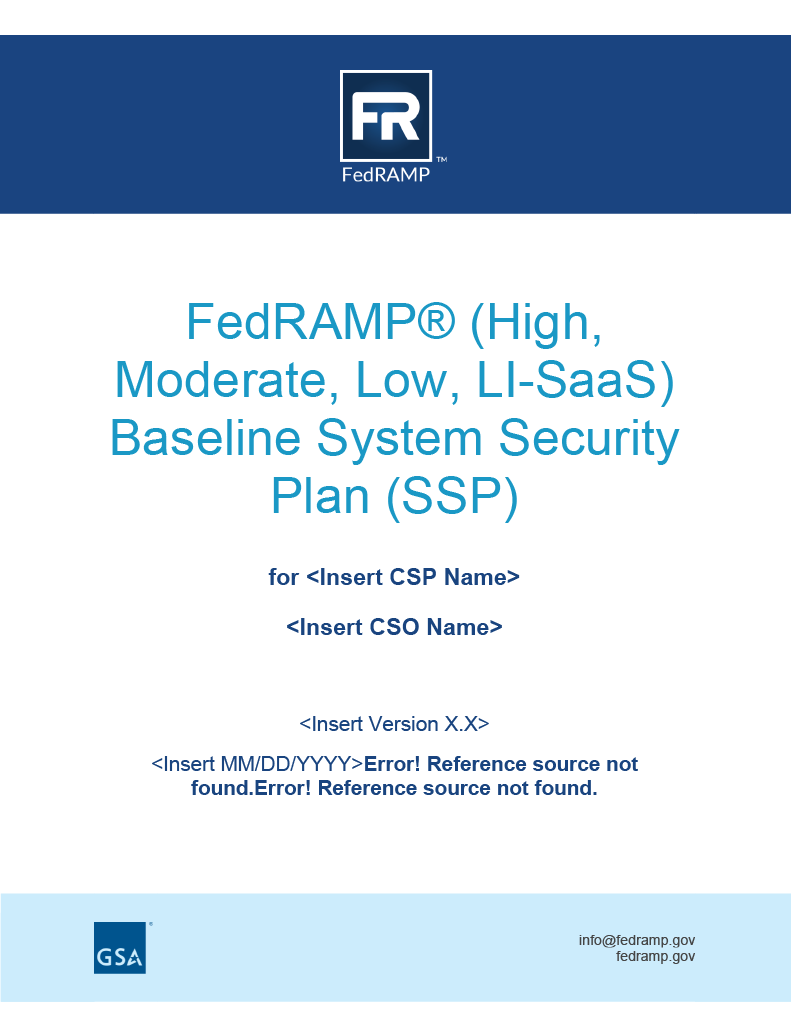 All FedRAMP artifacts include a title page. The content found on the title page is represented using core OSCAL content in `metadata`.
- `title` the artifact title as FedRAMP requires it to appear
- `published` the formal publication date of the artifact (using OSCAL `date-time-with-timezone` format)
- `version` the formal version number of the artifact
- a `prop` entry with:
- `name` set to `marking`
- `value` set to `Controlled Unclassified Information`
- an additional `prop` entry with:
- `name` set to `fedramp-version`
- `ns` set to `http://fedramp.gov/ns/oscal`
- `value` set to the the tag representing the version of FedRAMP being used
The CSP name is represented using the`cloud-service-provider` role in SSP [Roles](https://patterns.rufrisk.com/books/fedramp-common/page/roles).
The CSO name is addressed using the SSP [System Information, CSO Name](https://patterns.rufrisk.com/books/legacy-fedramp-system-security-plan-ssp/page/3-system-information#bkmrk-cso-name)
For assessment artifacts, the assessor name is represented using the `assessor` role in the SAP [Roles](https://patterns.rufrisk.com/books/fedramp-common/page/roles).
Additional document markings may be added using additional `prop` entries with `name` set to `marking` and `value` set to the required marking.
All documents in a digital authorization package for FedRAMP should specify the version that identifies which FedRAMP policies, guidance, and technical specifications its authors used during the creation and maintenance of the package.
##### Representation
```yaml
system-security-plan:
metadata:
title: \[EXAMPLE\] FedRAMP \[Baseline Name\] System Security Plan (SSP)
published: '2024-12-31T23:59:59Z'
last-modified: '2025-01-08T04:18:29Z'
version: fedramp-3.0.0rc1-oscal-1.1.2
oscal-version: 1.1.3
props:
- name: marking
value: cui
class: fedramp.gov
```
# Revision History
##### Document Revision History
The OSCAL revision history requires one FedRAMP extension to meet FedRAMP’s revision history requirements.
The revision history’s author information is derived from FedRAMP’s `party-uuid` flag, which points to a metadata `party` UUID value. The published field accepts the NIST OSCAL data type format. For details, see date-time-with-timezone on the NIST website.
All FedRAMP artifacts include a title page. The content found on the title page is represented using core OSCAL content in `metadata`.
- `title` the artifact title as FedRAMP requires it to appear
- `published` the formal publication date of the artifact (using OSCAL `date-time-with-timezone` format)
- `version` the formal version number of the artifact
- a `prop` entry with:
- `name` set to `marking`
- `value` set to `Controlled Unclassified Information`
- an additional `prop` entry with:
- `name` set to `fedramp-version`
- `ns` set to `http://fedramp.gov/ns/oscal`
- `value` set to the the tag representing the version of FedRAMP being used
The CSP name is represented using the`cloud-service-provider` role in SSP [Roles](https://patterns.rufrisk.com/books/fedramp-common/page/roles).
The CSO name is addressed using the SSP [System Information, CSO Name](https://patterns.rufrisk.com/books/legacy-fedramp-system-security-plan-ssp/page/3-system-information#bkmrk-cso-name)
For assessment artifacts, the assessor name is represented using the `assessor` role in the SAP [Roles](https://patterns.rufrisk.com/books/fedramp-common/page/roles).
Additional document markings may be added using additional `prop` entries with `name` set to `marking` and `value` set to the required marking.
All documents in a digital authorization package for FedRAMP should specify the version that identifies which FedRAMP policies, guidance, and technical specifications its authors used during the creation and maintenance of the package.
##### Representation
```yaml
system-security-plan:
metadata:
title: \[EXAMPLE\] FedRAMP \[Baseline Name\] System Security Plan (SSP)
published: '2024-12-31T23:59:59Z'
last-modified: '2025-01-08T04:18:29Z'
version: fedramp-3.0.0rc1-oscal-1.1.2
oscal-version: 1.1.3
props:
- name: marking
value: cui
class: fedramp.gov
```
# Revision History
##### Document Revision History
The OSCAL revision history requires one FedRAMP extension to meet FedRAMP’s revision history requirements.
The revision history’s author information is derived from FedRAMP’s `party-uuid` flag, which points to a metadata `party` UUID value. The published field accepts the NIST OSCAL data type format. For details, see date-time-with-timezone on the NIST website.
Note: FedRAMP OSCAL requires only the publication date, not the time. You may replace the time portion with all zeros.
FedRAMP tools should present only the date in a user-friendly format.
The `remarks` field is a Markup multiline format, which enables formatting of text and requires special handling.
##### Representation
```yaml
revisions:
- published: '2025-03-30T00:00:00Z'
version: '1.0'
oscal-version: '1.1.3'
props:
- name: party-uuid
ns: http://fedramp.gov/ns/oscal
value: 9f411fde-00b2-45b4-8043-129da20ce6dd
remarks: Initial publication.
roles:
- id: prepared-by
title: Prepared By
description: Cloud Service Provider
parties:
- uuid: 9f411fde-00b2-45b4-8043-129da20ce6dd
type: organization
name: Cloud Service Provider
responsible-parties:
- role-id: cloud-service-provider
party-uuids:
- 9f411fde-00b2-45b4-8043-129da20ce6dd
- role-id: prepared-by
party-uuids:
- 9f411fde-00b2-45b4-8043-129da20ce6dd
```
# Attachments
### Attachments
All OSCAL models handle attachments the same way. The following is used to attach files to OSCAL-based FedRAMP artifacts, such as when attaching policies and plans to a System Security Plan (SSP) or evidence to a Security Assessment Report (SAR).
Identifying attachments in an OSCAL FedRAMP SSP, POA&M, SAP or SAR requires:
- a `back-matter` object as a child to the root element
- a `resources` array, each `resources` entry includes:
- a `uuid` (required)
- a `title` (best practice)
- a `description` (encouraged)
- a `props` array with entries that can include:
- `name`=`type` with a token `value` (best practice): Identifies the attachment type. See below.
- `name`=`version` with a string `value` (best practice if applicable): Identifies the attachment's publushed version number
- `name`=`published` with an OSCAL [date-time-with-timezone](https://pages.nist.gov/metaschema/specification/datatypes/#date-time-with-timezone) `value` (best practice if applicable): Identifies the attachment's publication date
- either an `rlinks` array (strongly preferred) or `base64` object
- an `rlinks` array entry includes:
- a `href` with a relative or absolute URI (required)
- a `media-type` (best practice)
- consider ignoring `hashes` at this time
- a `base64` object:
- a `filename` field (encouraged)
- a `media-type` field (best practice)
- a `value`: Contains the Base 64 value of the attachemnt. While OSCAL does not require this field, a `base64` object has no significance without it.
##### Attachment Representation
```yaml
system-security-plan
back-matter:
resources:
- uuid: 11111111-2222-4000-8000-001000000001
title: Attachment Title
description: Linked attachment.
props:
- name: type
value: policy
rlinks:
- href: ./attachments/policy.pdf
media-type: application/pdf
- uuid: 11111111-2222-4000-8000-001000000002
title: Logo
description: A Base 64 embeded logo.
props:
- name: type
value: logo
base64:
filename: logo.png
media-type: application/png
value: '00000000'
```
### Allowed Values
The `type` property `value` may only have one of the following allowed values:
The value must be one of the following:
- `logo`: Indicates the resource is an organization's logo.
- `image`: Indicates the resource represents an image.
- `screen-shot`: Indicates the resource represents an image of screen content.
- `law`: Indicates the resource represents an applicable law.
- `regulation`: Indicates the resource represents an applicable regulation.
- `standard`: Indicates the resource represents an applicable standard.
- `external-guidance`: Indicates the resource represents applicable guidance.
- `acronyms`: Indicates the resource provides a list of relevant acronyms.
- `citation`: Indicates the resource cites relevant information.
- `policy`: Indicates the resource is a policy.
- `procedure`: Indicates the resource is a procedure.
- `system-guide`: Indicates the resource is guidance document related to the subject system of an SSP.
- `users-guide`: Indicates the resource is guidance document a user's guide or administrator's guide.
- `administrators-guide`: Indicates the resource is guidance document a administrator's guide.
- `rules-of-behavior`: Indicates the resource represents rules of behavior content.
- `plan`: Indicates the resource represents a plan.
- `artifact`: Indicates the resource represents an artifact, such as may be reviewed by an assessor.
- `evidence`: Indicates the resource represents evidence, such as to support an assessment finding.
- `tool-output`: Indicates the resource represents output from a tool.
- `raw-data`: Indicates the resource represents machine data, which may require a tool or analysis for interpretation or presentation.
- `interview-notes`: Indicates the resource represents notes from an interview, such as may be collected during an assessment.
- `questionnaire`: Indicates the resource is a set of questions, possibly with responses.
- `report`: Indicates the resource is a report.
- `agreement`: Indicates the resource is a formal agreement between two or more parties.
---
# Parties and Locations
Individuals, teams, corporations and government agencies are represented in OSCAL `metadata` using the `parties` array. Location information can be included within a party's information or defined separately for sharing.
#### Locations
Define a common location to be associated with multiple parties, or as stand-alone information. In `metadata` include:
- a `locations` array. Each entry has:
- a `uuid` (required)
- a `title` (best practice)
- an `address` object with:
- a `type` set to `work`
- an `address-lines` array with one or more string entries representing the street number, mail stop, or similar.
- a `city` as appropriate for your geography
- a `state` as appropriate for your geography
- a `postal-code` as appropriate for your geography
```yaml
root-model-name
metadata:
locations:
- uuid: 11111111-2222-4000-8000-003000000001
title: CSP HQ
address:
type: work
addr-lines:
- Suite 0000
- 1234 Some Street
city: Haven
state: ME
postal-code: '00000'
```
##### Locations for Stand-Alone Information
For locations such as Data Centers that may be expressed in an SSP, POA&M, AP or AR:
- add a `props` array with an entry:
- `name` set to `type`
- `value` set to `data-center` (Additional values are allowed, but are not well-defined at this time.)
- `class` set to either `primary` or `alternate`
```yaml
root-model-name
metadata:
locations:
- uuid: 11111111-2222-4000-8000-003000000002
title: Primary Data Center
address:
addr-lines:
- 2222 Main Street
city: Anywhere
state: --
postal-code: 00000-0000
country: US
props:
- name: type
value: data-center
class: primary
```
#### Parties
In `metadata` include:
- a `parties` array. Each entry has:
- a `uuid` (required)
- a `type` (required) set to `individual` or `organization`
- Use `organizaiton` for teams, companies and agencies.
- a `name` (best practice)
- a `short-name` (optional - recommended for organizations with well-known acronyms)
- an `email-addresses` array with each entry containing
- a string represening an [RFC-6531](https://tools.ietf.org/html/rfc6531) formatted email address
- a `telephone-numbers` array with each entry contianing an object with:
- `type` (optional) set to `home`, `office` or `mobile` (Other values allowed, but not well defined)
- `number` set to a string representing the phone number
- **either** a `location-uuids` array or an `addresses` array:
- `location-uuids` array entries contain the UUID value of defined `locations` array entries.
- `addresses` array entries each incude:
- a `type` set to `work` or `home` as appropriate
- an `address-lines` array with one or more string entries representing the street number, mail stop, or similar.
- a `city` as appropriate for your geography
- a `state` as appropriate for your geography
- a `postal-code` as appropriate for your geography
```yaml
root-model-name
metadata:
parties:
- uuid: 11111111-2222-4000-8000-004000000001
type: organization
name: Cloud Service Provider (CSP) Name
short-name: CSP Acronym/Short Name
email-addresses:
- name@example.com
telephone-numbers:
- number: '2020000001':
location-uuids:
- 11111111-2222-4000-8000-003000000001
```
Alternatively use `addresses` instead of `location-uuids`:
```
addresses:
- type: work
addr-lines:
- 1800 F St. NW
city: Washington
state: DC
postal-code: '20006'
country: US
```
##### Logos and Web Sties
To associate a logo or web site with a party:
- add a `links` array to the party
To identify a web site:
- add an etry to the `links` array with:
- `href` set to the URL of the organization's web site
- `rel` set to `homepage`
To identify a logo:
- add an entry to the `back-matter` / `resources` array with:
- a `uuid` (required)
- a `title` (best practice)
- `description` (optional)
- add a `props` array with an entry:
- `name` set to `type`
- `value` set to `logo`
- **either** an `rlinks` array or a `base64` object
- an `rlinks` entry includes:
- `href` (required) with a path to the logo (relative path strongly recommended)
- `media-type` (best practice) with an appropriate [IANA-recognized Media Type](https://www.iana.org/assignments/media-types/media-types.xhtml)
- a `base64` object includes:
- `media-type` (required for rendering) with an appropriate [IANA-recognized Media Type](https://www.iana.org/assignments/media-types/media-types.xhtml)
- `value` with the Base 64 value of the logo
- add an etry to the `links` array with:
- `href` with a URI Fragement that references the UUID of the `resources`
- The `href` value must start with a hashtag (`#`) character followed by the UUID value of the resource
- `rel` set to `logo`
```yaml
root-model-name
metadata:
parties:
- uuid: d865602c-9d3b-49d7-8125-ce3f1ca04231
type: organization
name: CSP
links:
- href: https://csp.example.com
rel: homepage
- href: #891263fb-a5d6-44db-8d73-51bb8a9a3610
rel: logo
back-matter:
resources:
- uuid: 891263fb-a5d6-44db-8d73-51bb8a9a3610
title: CSP Logo
description: Logo of the organization that prepared the document.
props:
- name: type
value: logo
rlinks:
- href: ./attachments/img/logo.png
base64:
filename: logo.png
media-type: image/png
value: 00000000
```
**Note:** For the logo, use rlink with a relative path or embed the logo as base64.