System Components and Inventory
Inventory Approaches
OSCAL makes two approaches available for depicting the system inventory:
-
Flat Approach: Aligns with today's FedRAMP Integrated inventory workbook where all of the information on a spreadsheet row is captured in a single assembly.
-
Normalized Approach: Common information is normalized as OSCAL components. inventory-items point to components for common information.
With the flat approach, all content on a spreadsheet row appears in a single OSCAL inventory-item assembly. This results in a great deal of redundant information but is a simple transition from the current spreadsheet approach.
See Inventory: Flat Approach for more information.
Retrofit Adoption Path: MVP
If you have an existing FedRAMP authorization and are using the FedRAMP inventory spreadsheet template, start with the flat approach, and migrate over time to the normalized approach.
With the Normalized approach, common information is captured once in a component assembly. Each instance of that component has its own inventory-item assembly, which cites the relevant component and only includes information unique to that instance.
See Inventory: Normalized Approach for more information.
New Adoption Path: Core
If you are adopting OSCAL at the beginning of your FedRAMP journey, define components first, then regerence those components as you generate inventory.
Example
The same Linux operating system is used as the platform for all database and web servers. Most details about operating system are captured once as a component, including OS name, version number, and patch level.
If four Linux instances are used, each instance is an inventory item with a unique IP address and MAC address. Only those unique pieces are captured at the inventory level. All four inventory-items are linked to the component.
Inventory: Flat Approach
The flat approach to inventory is only intended as a starting point for service providers converting from a legacy FedRAMP inventory spreadsheet template.
If you are not converting legacy inventory, use the Inventory: Normalized Approach.
With the flat approach, all content on a spreadsheet row appears in a single OSCAL inventory-item assembly. This results in a great deal of redundant information but is a simple transition from the current spreadsheet approach.
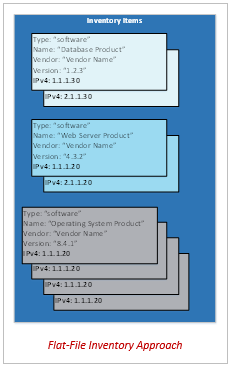
Flat Representation
system-security-plan:
  uuid: 11111111-2222-4000-8000-000000000000
  system-implementation:
    inventory-items:
    - uuid: 11111111-2222-4000-8000-011000000001
      description: Legacy Example (No implemented-component).
      props:
      - name: asset-id
        value: unique-asset-ID-01
      - name: ipv4-address
        value: 10.1.1.1
      - name: ipv6-address
        value: 2001:db8:3333:4444:5555:6666:7777:8888
      - name: virtual
        value: 'no'
      - name: public
        value: 'no'
      - name: fqdn
        value: dns.name
      - name: uri
        value: uniform.resource.identifier
      - name: netbios-name
        value: netbios-name
      - name: mac-address
        value: 00:00:00:00:00:00
      - name: asset-type
        value: operating-system
      - name: serial-number
        value: 'Serial #'
      - name: asset-tag
        value: Asset Tag
      - name: vlan-id
        value: VLAN Identifier
      - name: network-id
        value: Network Identifier
      - name: scan-type
        ns: http://fedramp.gov/ns/oscal
        value: infrastructure
      - name: vendor-name
        ns: http://fedramp.gov/ns/oscal
        value: Big Vendor, Inc.
      - name: scan-type
        ns: http://fedramp.gov/ns/oscal
        value: database
      - name: allows-authenticated-scan
        value: 'no'
        remarks: If no, explain why. If yes, omit remarks field.
      - name: physical-location
        value: Physical location of Asset
      - name: is-scanned
        value: 'yes'
        remarks: If no, explain why. If yes, omit remarks field.
      - name: function
        value: Required brief, text-based description.
        remarks: Optional, longer, formatted description.
      links:
      - href: '#11111111-2222-4000-8000-009000000002'
        rel: validation
      - href: '#11111111-2222-4000-8000-001000000059'
        rel: baseline
      responsible-parties:
      - role-id: asset-owner
        party-uuids:
        - 11111111-2222-4000-8000-004000000016
      - role-id: asset-administrator
        party-uuids:
        - 11111111-2222-4000-8000-004000000017
      remarks: 'COMMENTS: Additional information about this item.

        This links to a FIPS 140-2 validated software component that is used by this
        inventory item. This type of linkage to a validation through the component
        is preferable to the link[rel=''validation''] example above.'
Notes:
The value of asset-type determines whether the identified asset-administrator is managing a system or an application. Currently, any FedRAMP-defined asset-type implies the management of a system, and therefore, is to be scanned as infrastructure.
Inventory: Normalized Approach
The normalized approach is prefered. Organizations starting new with no legacy inventory reporting should use this.
For organizations converting from a legacy FedRAMP inventory spreadsheet template, consider starting with the Inventory: Flat Approach and migrating to the normalized approach over time.
With the Normalized approach, common information is captured once in a component assembly. Each instance of that component has its own inventory-item assembly, which cites the relevant component and only includes information unique to that instance.
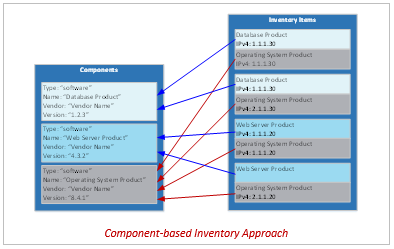
Component-based Representation
system-security-plan:
  uuid: 11111111-2222-4000-8000-000000000000

  system-implementation:
    components:
    - uuid: 11111111-2222-4000-8000-009000300300
      type: software
      title: Linux Operating System
      description: This is a web server that communicates with a database via an encrypted connection
      props:
      - name: asset-type
        value: operating-system
      - name: allows-authenticated-scan
        value: 'yes'
      - name: scan-type
        ns: http://fedramp.gov/ns/oscal
        value: web
      links:
      - href: '#11111111-2222-4000-8000-001000000059'
        rel: baseline
      status:
        state: operational

    inventory-items:
    - uuid: 11111111-2222-4000-8000-011000000023
      description: Instance of the Linux Operating System
      props:
      - name: asset-id
        value: unique-asset-ID-23
      - name: asset-type
        value: operating-system
      - name: ipv4-address
        value: 10.23.23.23
      - name: ipv6-address
        value: 0000:0000:0000:0000:0000:ffff:0a17:1717
      - name: virtual
        value: 'yes'
      - name: public
        value: 'no'
      - name: fqdn
        value: linux-host.example.internal
      - name: physical-location
        value: Primary Data Center
      - name: is-scanned
        value: 'yes'
      - name: scan-type
        ns: http://fedramp.gov/ns/oscal
        value: infrastructure
      responsible-parties:
      - role-id: asset-owner
        party-uuids:
        - 11111111-2222-4000-8000-004000000010
      - role-id: asset-administrator
        party-uuids:
        - 11111111-2222-4000-8000-004000000017
      implemented-components:
      - component-uuid: 11111111-2222-4000-8000-009000300300
Notes:
- If component-sample is an image of a Linux virtual machine (VM), and 10 instances of that VM are in use, there would be one (1) component assembly and ten (10) inventory-item assemblies, all referencing the same component.
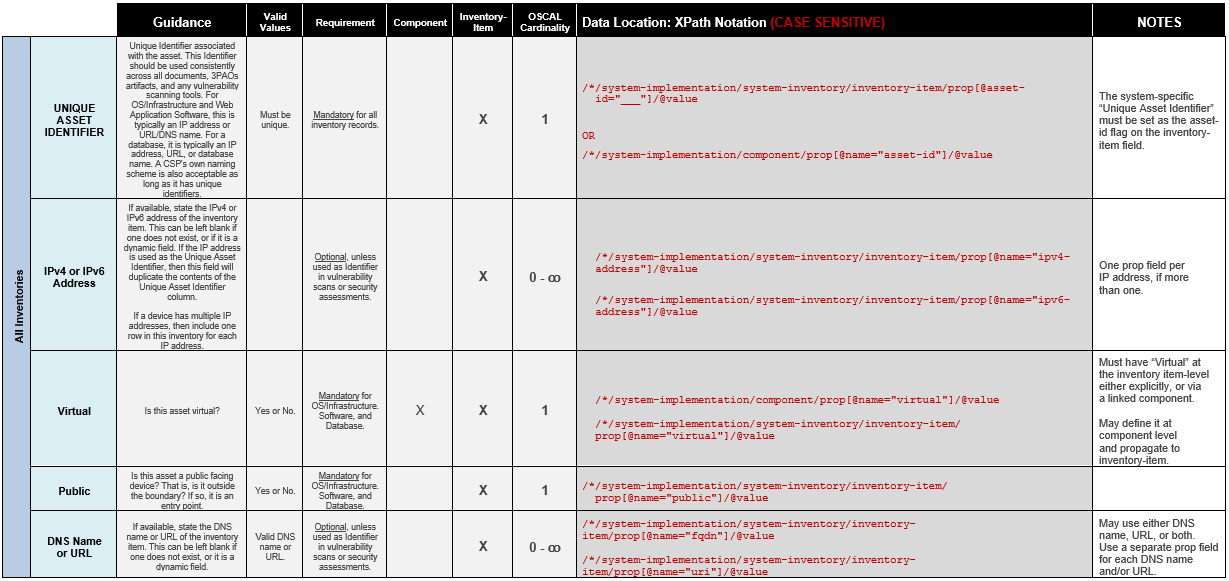
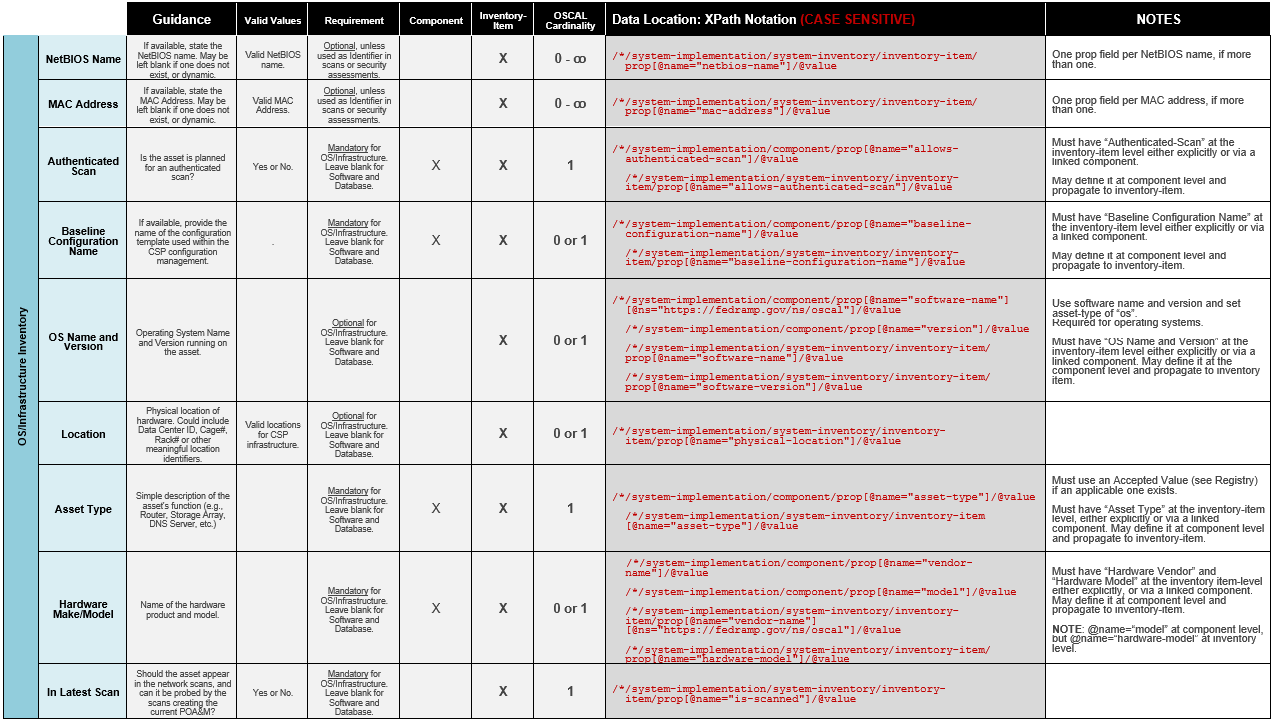
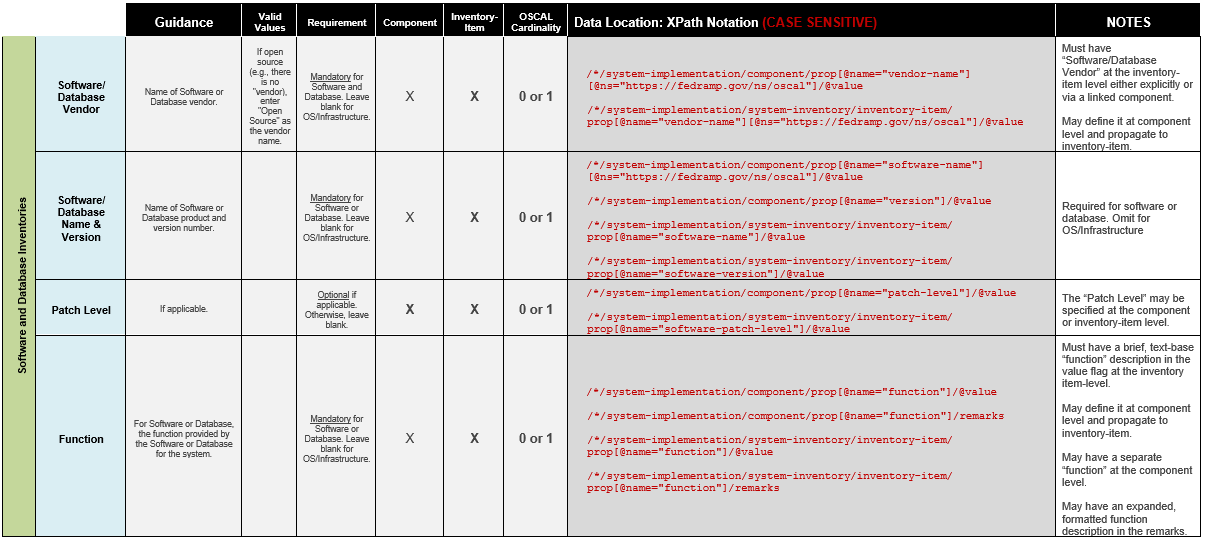
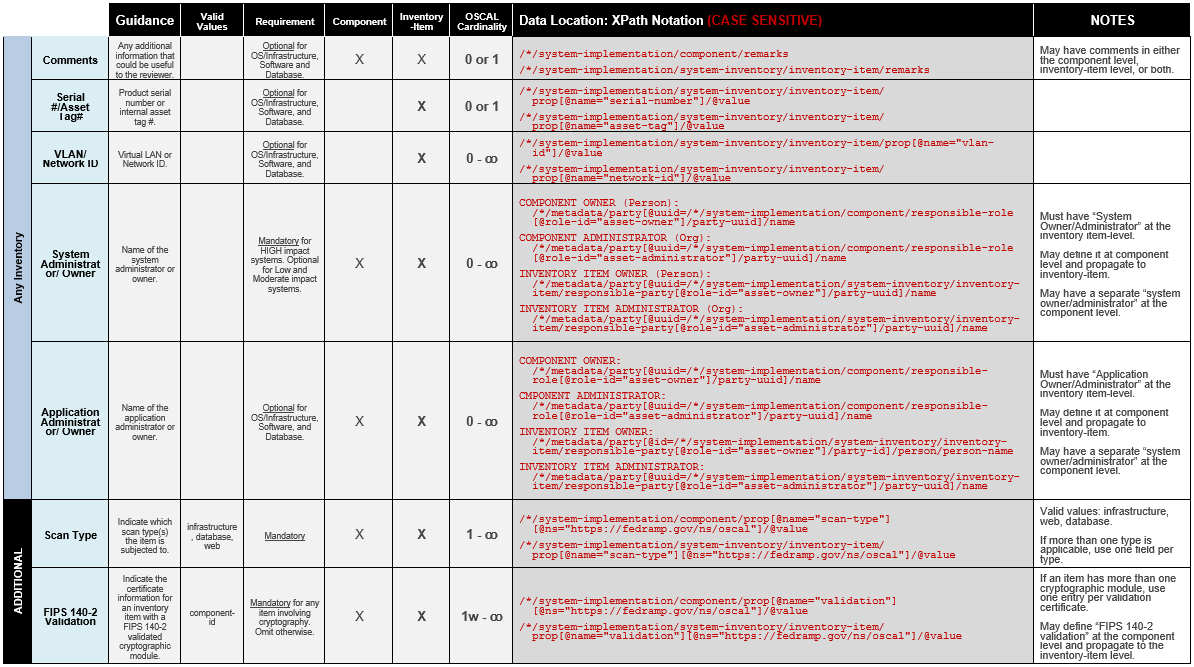
Inventory Data Locations and XPath Queries
The following queries are intended to show where to find each piece of information within the system inventory template.