Retrofit Adoption Path
If you need to convert legacy documentation to OSCAL, follow this path.
If you are approaching OSCAL to intially create your system security plan and do not have legacy documentation to convert, follow the Native Adoption Path.
Organizations with existing Word and Excel based authorization packages must first migrate their content to OSCAL with only the minimum necessary refactoring. The Retrofit Adoption Path starts with a minimum viable product (MVP) and evolves to more comprehensive use cases in phases.
This approach initially sacrifices data normalization in favor of a more rapid transition to OSCAL. It allows conversion of content as-is, then gradually eliminates redundancy and normalizes data in subsequent phases. This is possible because OSCAL is designed to meet you where you are, and it allows gradual progress toward its more normalized ideal representation.
SSP Retrofit Adoption Overview
The OSCAL Foundation recommends the following addoption path for migrating legacy FedRAMP SSP content to OSCAL.
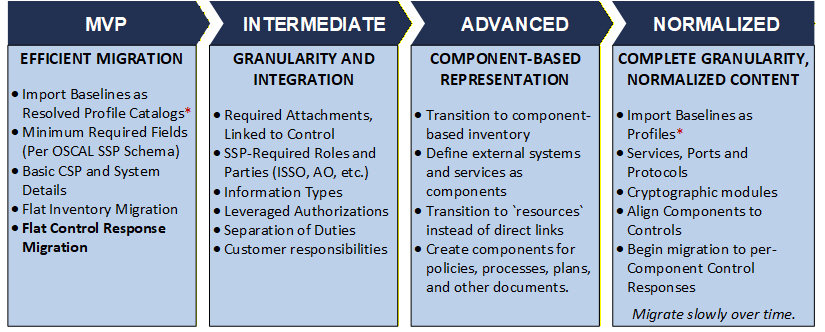
SSP Adoption Path
MINIMUM VIABLE PRODUCT (MVP)
-
Import Baselines as Resolved Profile Catalogs
- Get started with Use pre-processed control baselines.
- See Baselines for more information.
-
Minimum Required Fieldss and Basic CSP and System Details.
-
metadataincludes:title,published,last-modified,version,oscal-versionroles:cloud-service-provider,information-system-security-officer, others as cited in controls.- See Roles for more information on roles.
parties: the CSP, the ISSO.- See Parties and Locations for more information on defining parties.
responsible-parties: exactly one, linking the CSP party to the CSP role- See Roles for more information on associating parties with roles.
-
system-characteristicsincludes:-
system-id,system-name,system-name-short,description, cloud-service-modelpropand cloud-deployment-modelprop- See 3. System Information for more information
-
security-sensitivity-level(fips-199-high,fips-199-moderate,fips-199-low) -
system-information: exactly one entry with Appendix K pasted into thedescription -
statusset tooperational(required OSCAL fields)- See System Status for more information.
-
authorization-boundary,network-architectureanddata-flow:descriptionandlinksentry identifying the external attachment.- See 8. Illustratred Architecture and Narratives for more information.
-
-
system-implementationincludes:- `components:
- Exactly one, with
type=this-system(Known as the "this-system" component, which represents the system as a whole.) - See Components for more information.
- Exactly one, with
- `components:
-
-
Flat Inventory Migration
- Convert directly from spreadsheet.
- Non-normalized. No corrisponding components.
system-implementation:inventory-items: All inventory converted from Excel spreadsheet
-
Migrate Control Response
- Minimum-necessary adjustments for OSCAL.
- All response statements in the "this-system" component.
control-implementationimplemented-requirement(AC-1, AC-2, etc.)set-parameters: set parameters as neededstatement(part a, part b, etc.by-component("this system")description: Content directly from legacy Word SSP (part a, part b, etc.)implementation-statusresponsible-roles: One entry per role. Userole-id. Must matchmetadata/roles/id.
INTERMEDIATE
-
Required Attachments
- Add direct
linksfrom the appropriate controls to identify relevant attachments
- Add direct
-
Required SSP Roles
metadata/rolesThe roles required by SSP (System owner, ISSO, AO, etc.)metada/parties: the people, teams and organizations responsible for the above rolesmetadata/responsible-parties: links the aboverolesandparties
-
Information Types
system-characteristics/system-information/information-types- a single entry for each row in appendix K.
-
Leveraged Authorizations
system-implementation/leveraged-authorizations:- one entry for leveraged authorization
- corrisponding
metadata/partiesentry for each - corrisponding
system-implementation/componentsfor each.
-
Separation of Duties Matrix
system-implementation/users- one entry per row in Table 11.1
./authorized-privilege/functions-performed: SSP Table 11.1 Duty Description (just one entry in the array)./authorized-privilege/title: Required by OSCAL, not by FedRAMP. Recommend duplicating thefunctions-performedcontent.role-ids: linksmetadata/rolestofunctions-performed
-
Customer Responsibility and Inheritance:
- Move customer responsibility statements to
//by-components/export/responsibilities
- Move customer responsibility statements to
ADAVANCED
-
Normalize Inventory: Transition flat inventory to component-based inventory.
- Use
componentsto the greatest degree practical inventory-itemsbecome implemented instances of components
- Use
-
External Systems and Services
system-implementation/componentsentries for each
-
Transition to
resources- Where practical, use URI fragments in
linksto reference resources instead of direct links. See [section citation and link] for more information.
- Where practical, use URI fragments in
-
Components for Required Documents
- One for each required document (policies, procedures, plans, user guides, Rules of Behavior)
- See [Section citation and link] for more information.
NORMALIZED
-
Import Baselines as Profiles
- Eliminate reliance on resolved profile catalogs
- Ensure your tools have the ability to process profiles by this phase.
- Ensure consumers of your SSP are able to process profiles.
-
Services, Ports and Protocols
-
Migrate to component-based control responses
- Add
componentsentries as needed to support normalized inventory - Add
by-componentsentries toimplemented-requirementsfor each relevant component - Add/move component-specific control responses to their associated
by-componentsresponse. - Migrate slowly over time.
- Add
-
Cryptographic Modules (App Q table)
Profile Imports
The decision to import a profile or resolved profile catalog is dependent on the profile processing capability of your tools and the tools of any receiving party.
Pre-processed resolved profile catalogs are a simplified way to get started; however, OSCAL tools must ultimately process profiles. Processing OSCAL profiles is the only way tools can handle control overlays and multiple frameworks.
If you elect to start with resolved profile catalogs, migrate to profiles as soon as yoru tools and your recipients tools can perform this processing.
Easy Migration
Within an OSCAL SSP, migration is performed simply by changing the import-profile statement to reference the appropriate profile instead of a resolved profile catalog.