
Preferred Approach
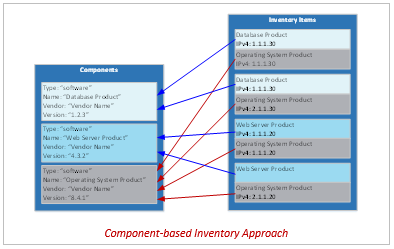
Component-based Representation
system-security-plan:
  uuid: 11111111-2222-4000-8000-000000000000

  system-implementation:
    components:
    - uuid: 11111111-2222-4000-8000-009000300300
      type: software
      title: Linux Operating System
      description: This is a web server that communicates with a database via an encrypted connection
      props:
      - name: asset-type
        value: operating-system
      - name: allows-authenticated-scan
        value: 'yes'
      - name: scan-type
        ns: http://fedramp.gov/ns/oscal
        value: web
      links:
      - href: '#11111111-2222-4000-8000-001000000059'
        rel: baseline
      status:
        state: operational

    inventory-items:
    - uuid: 11111111-2222-4000-8000-011000000023
      description: Instance of the Linux Operating System
      props:
      - name: asset-id
        value: unique-asset-ID-23
      - name: asset-type
        value: operating-system
      - name: ipv4-address
        value: 10.23.23.23
      - name: ipv6-address
        value: 0000:0000:0000:0000:0000:ffff:0a17:1717
      - name: virtual
        value: 'yes'
      - name: public
        value: 'no'
      - name: fqdn
        value: linux-host.example.internal
      - name: physical-location
        value: Primary Data Center
      - name: is-scanned
        value: 'yes'
      - name: scan-type
        ns: http://fedramp.gov/ns/oscal
        value: infrastructure
      responsible-parties:
      - role-id: asset-owner
        party-uuids:
        - 11111111-2222-4000-8000-004000000010
      - role-id: asset-administrator
        party-uuids:
        - 11111111-2222-4000-8000-004000000017
      implemented-components:
      - component-uuid: 11111111-2222-4000-8000-009000300300
Notes:
- If component-sample is an image of a Linux virtual machine (VM), and 10 instances of that VM are in use, there would be one (1) component assembly and ten (10) inventory-item assemblies, all referencing the same component.
Inventory Data Locations and XPath Queries
The following queries are intended to show where to find each piece of information within the system inventory template.
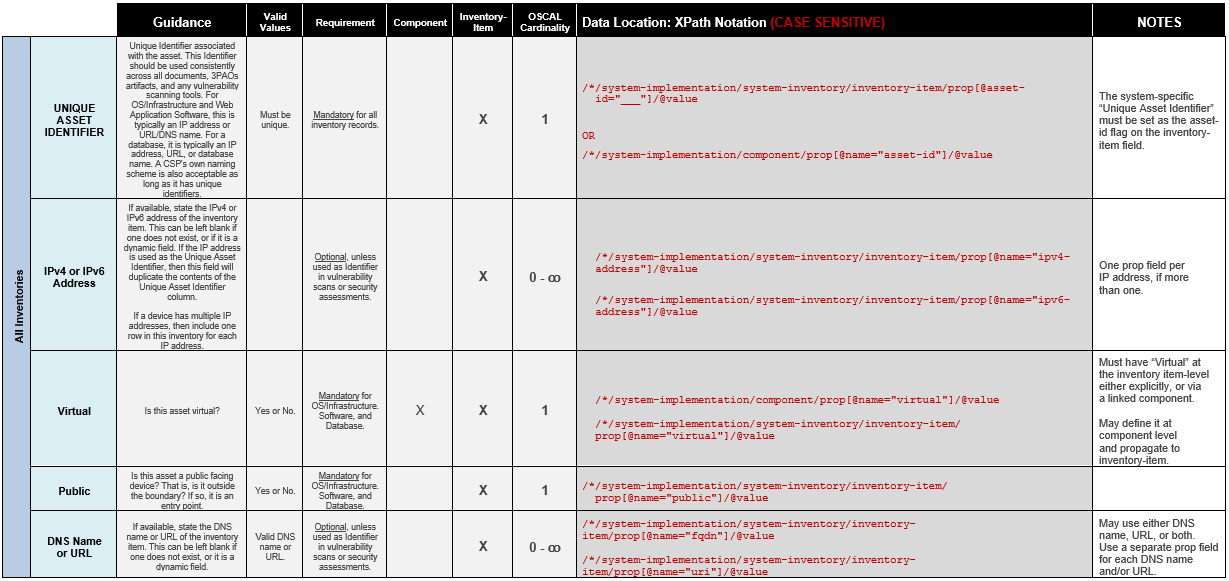
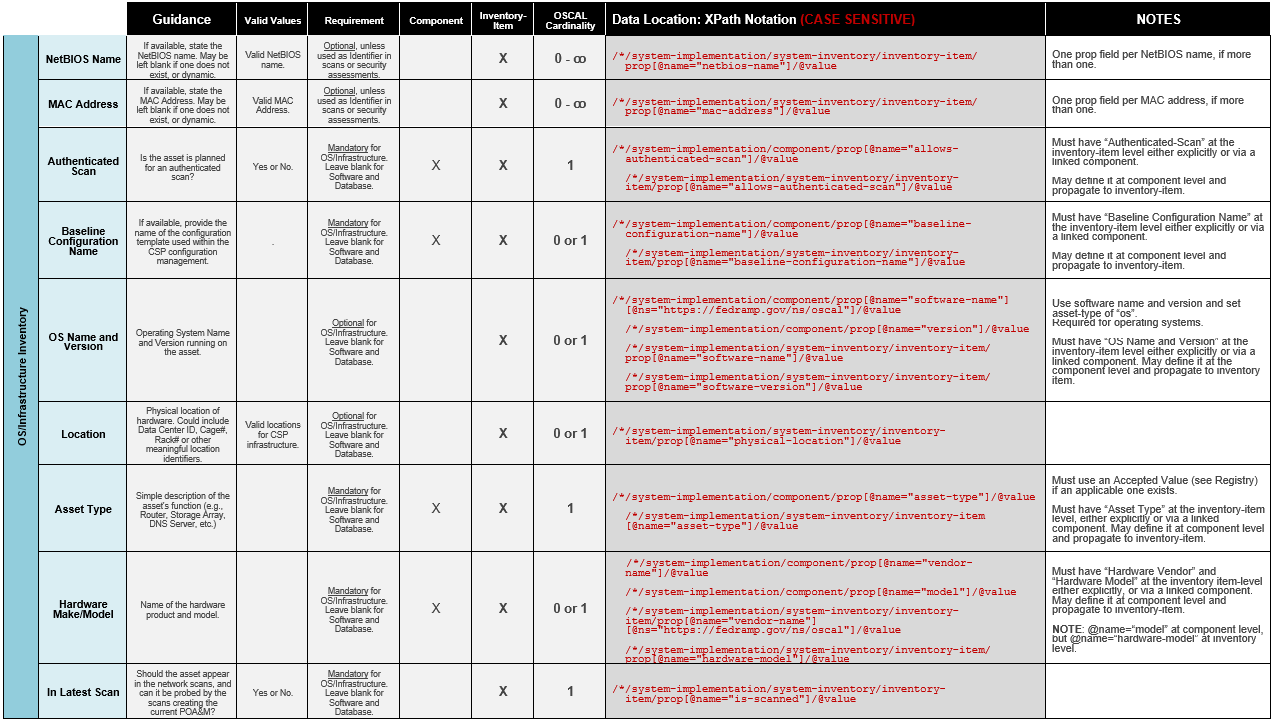
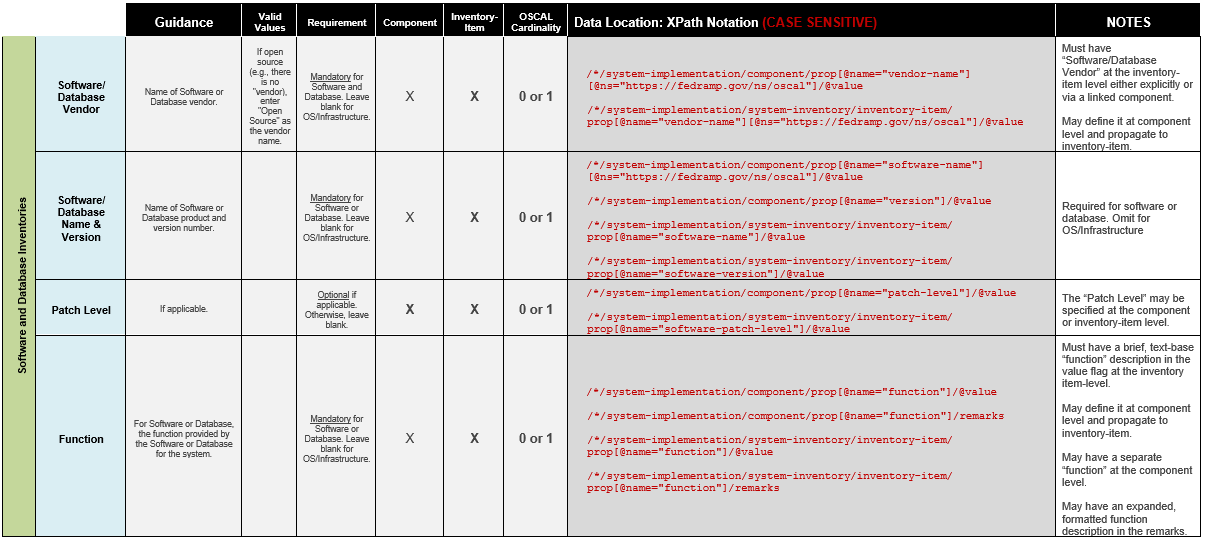
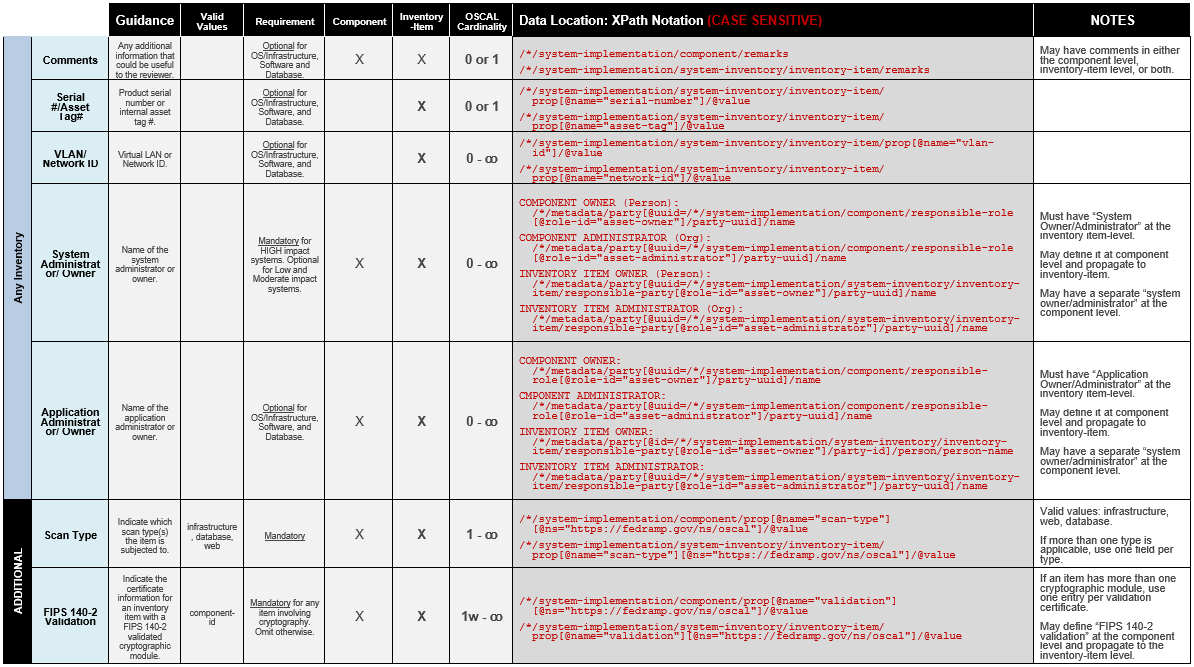
XPath Queries
Number of Inventory Items:
    count(/*/system-implementation/system-inventory/inventory-item)
  Number of Hardware Components:
    count(/*/system-implementation/component[@type="hardware"])
  Number of Software Components:
    count(/*/system-implementation/component[@type="software"])
  In Latest Scan?:
    /*/system-implementation/system-inventory/inventory-item[1]/prop[@name="is-scanned"]/@value

  List Inventory Items Not Scanned:
    /*/system-implementation/system-inventory/inventory-item/prop[@name="is-scanned"][@value='no']/../prop[@name='ipv4-address']
  List of Reasons Inventory Items Were Not Scanned:
    /*/system-implementation/system-inventory/inventory-item/prop[@name="is-scanned"][@value='no']/remarks/node()
Unlike most XPath 2.0 queries in this document, the following queries cannot be easily converted to XPath 1.0. If working with XPath 1.0, it may be necessary to perform each search with two separate queries. These queries will list all the IPv4 addresses for each scan type (infrastructure, web, and database), whether using the flat-file inventory approach or the component-based approach.
XPath Queries
distinct-values( (let $key:=/*/system-implementation/component[prop [@name='scan-type'] [@ns='http://fedramp.gov/ns/oscal']='infrastructure']/@uuid return /*/system-implementation/system-inventory/inventory-item [implemented-component/@component-uuid=$key]/ prop[@name='ipv4-address']) | (/*/system-implementation/system-inventory/inventory-item/prop[@name='ipv4-address'][../prop[@name='scan-type'][@ns='http://fedramp.gov/ns/oscal'] [string(.)='infrastructure']]) )
IPv4 Address of All Inventory Items Identified for Web Scanning:
distinct-values( (let $key:=/*/system-implementation/component[prop[@name='scan-type'][@ns='http://fedramp.gov/ns/oscal']='web']/@uuid return /*/system-implementation/system-inventory/inventory-item [implemented-component/@component-uuid=$key]/prop[@name='ipv4-address']) | (/*/system-implementation/system-inventory/inventory-item/prop[@name='ipv4-address'][../prop[@name='scan-type'][@ns='http://fedramp.gov/ns/oscal'][string(.)='web']]))
IPv4 Address of All Inventory Items Identified for Database Scanning:
distinct-values( (let $key:=/*/system-implementation/component[prop [@name='scan-type'] [@ns='http://fedramp.gov/ns/oscal']='database']/@uuid return /*/system-implementation/system-inventory/inventory-item [implemented-component/@component-uuid=$key]/prop[@name='ipv4-address']) | (/*/system-implementation/system-inventory/inventory-item/prop[@name='ipv4-address'][../prop[@name='scan-type'][@ns='http://fedramp.gov/ns/oscal'][string(.)='database']]))
IPv4 Address of All Items Where an Authenticated Scan is Possible:
distinct-values( (/*/system-implementation/system-inventory/inventory-item/prop [@name='ipv4-address'][../prop[@name="allows-authenticated-scan"][@value='yes']] ) | (let $key:=/*/system-implementation/component[prop [@name='allows-authenticated-scan'][@value='yes']]/@uuid return /*/system-implementation/system-inventory/inventory-item [implemented-component/@component-uuid=$key]/prop[@name='ipv4-address']))
IPv4 Address of All Items Where an Authenticated Scan is Not Possible:
distinct-values( (/*/system-implementation/system-inventory/inventory-item/prop[@name='ipv4-address'][../prop[@name="allows-authenticated-scan"][@value='no']] ) | ( let $key:=/*/system-implementation/component[prop [@name='allows-authenticated-scan'][@value='no']]/@uuid return /*/system-implementation/system-inventory/inventory-item [implemented-component/@component-uuid=$key]/prop[@name='ipv4-address']) )
Authenticated Scan Justification (if Authenticate Scan is "no"):
/*/system-implementation/system-inventory/inventory-item/prop[@name="allows-authenticated-scan"][@value="no"]/remarks/node()
OR
/*/system-implementation/component/prop[@name="allows-authenticated-scan"] [@value="no"]/remarks/node()